
Code Snippets Pro
Pre-activated
Download
Version
4.1.0
Changelog
Updated
Auto-update
Yes
How it works
AUTO-UPDATE ENABLED
Premium feature
Updates & install — both one click
Powered by GPL Downloads Auto Updater · Native WordPress integration · Included free
01 · UPDATES
Auto-updates, one click
New versions delivered weekly. Install instantly from your WordPress dashboard — no ZIP uploads.
✓ Same as wp.org02 · INSTALL
Auto-install, one click
Push directly to any site from your dashboard. Zero downloads, zero FTP, zero manual steps.
✓ Unlimited sitesVS OTHER GPL PROVIDERS
✕ Manual ZIP downloads✕ FTP / cPanel uploads
→
✓ One-click everything✓ Native WP dashboard
Included free in your All Access plan
Learn more →
File scan
Clean
Details
Members can request updates and report problems from here.
About this plugin
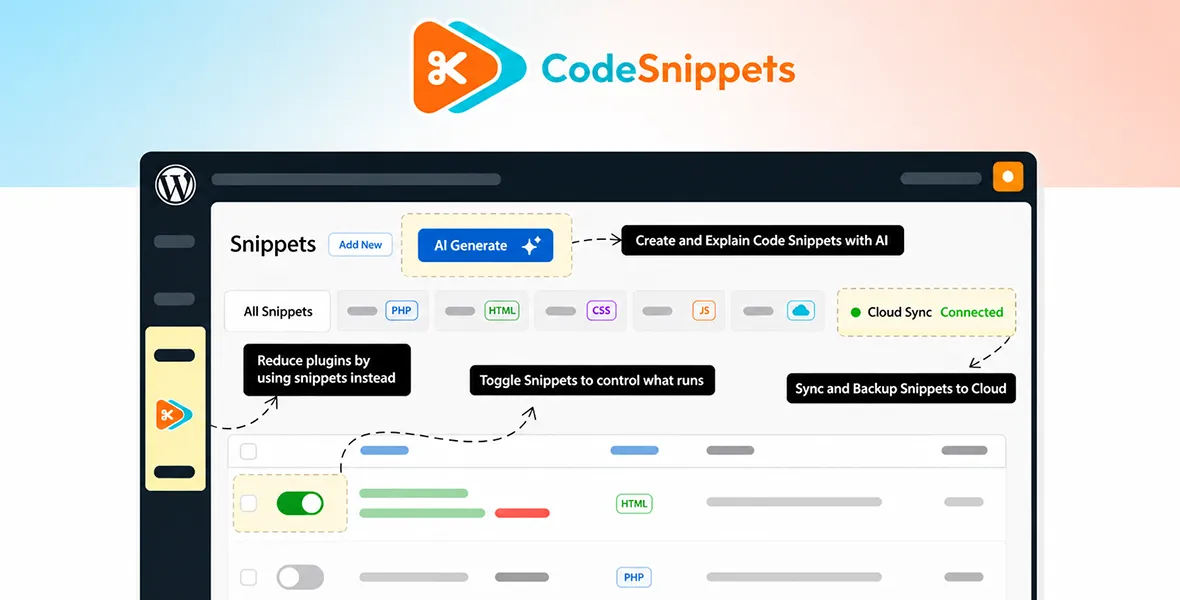
Code Snippets Pro is a brilliant WordPress plugin for developers and site owners who want to add custom code without editing theme files directly.
It lets you manage PHP, CSS, JavaScript, and HTML snippets from a clean dashboard, keeping everything organised and easy to toggle on or off. Compatible with multisite networks and featuring a built-in code editor with syntax highlighting, it’s a safe, tidy way to customise your WordPress site without risking your core files.
Changelog
Version 4.1.0-beta.1
19 Oct 20266 new4 improved13 fixed
New
- Universal search in the plugin header, for finding snippets and their code, settings, stats, the welcome screen, documentation and Community Cloud snippets from one field, with keyboard navigation and a full results page.
- Cloud Library snippets and per-snippet performance and security insights in the universal search results, with insights opening from a result. (PRO)
- Unified Snippets, for scanning a site for custom code in theme files, Customizer CSS, other plugins' settings, post content, page builder layouts and rendered pages, and importing what it finds as inactive snippets. A rescan reports new, changed and removed code, and code that cannot run as a snippet is listed in a read-only View Only tab. (PRO)
- Snippet preview, for running the draft being edited on a chosen front page, post, page or admin screen in a separate tab without saving or activating it. The preview refreshes as the snippet is edited, lists JavaScript errors, and blocks outbound requests, emails, database writes and file writes unless they are allowed in settings. (PRO)
- Labels in the version switcher marking the current, latest, beta and release candidate builds, and the WordPress version each was tested up to.
- A dialog for the AI Agent's starter prompts, for sending a prompt, editing it before sending or going back, and a link to the AI Agent from the Generate dialog. (PRO)
Improved
- The version switcher lists the Code Snippets Pro builds available to the site's licence from Code Snippets Cloud, instead of the free plugin's builds from WordPress.org. Downloads are verified before installing, a failed switch is rolled back, and a site without a cloud connection or with a licence problem is told how to resolve it. (PRO)
- The AI Agent reopens the current conversation after the page is reloaded or revisited. (PRO)
- The version switch warning now notes that beta and release candidate builds are not recommended for production sites.
- Resetting caches now fetches the list of available plugin versions again, and reports how many were found or why none could be listed.
Fixed
- Fixed the snippets list showing an out-of-date state on sites with a page cache, as the plugin's REST API responses were being cached.
- Fixed the Search with AI option missing from the Community Cloud search method menu. (PRO)
- Fixed the share with subsites setting not being applied when a network snippet was saved on multisite.
- Fixed stylesheet and script snippets shared with subsites not being output on a subsite that activated them. (PRO)
- Fixed the Elementor source widget logging a warning on sites with condition snippets, and offering condition and trashed snippets. (PRO)
- Fixed a PHP deprecation notice and a missing browser tab title on the Edit Snippet screen.
- Fixed a long unbroken line of code widening the snippet editor page and pushing the sidebar out of view.
- Fixed admin screens waiting on remote requests for as long as the site's default timeout allows when the Code Snippets service or WordPress.org is slow or unreachable: these requests now give up after 5 seconds, or 3 seconds for the welcome content.
- Fixed version switch messages being hidden by the admin notice filter, and showing markup from the response as HTML.
- Fixed the version list refresh reporting success when the versions could not be fetched.
- Fixed safe mode failing on sites running a plugin that builds URLs while WordPress is identifying the current user, and breaking REST API URLs. Safe mode is now carried on admin links only.
- Fixed the snippet import routes allowing a subsite administrator on multisite to import network snippets without the network capability. Thanks to Artus KG for responsibly disclosing this issue.
- Fixed the snippet source shortcodes revealing snippet code in posts written by users who cannot manage snippets. Thanks to Het Kalariya for responsibly disclosing this issue.
Key features
- Snippet Management: Manage code snippets with an intuitive graphical interface instead of editing your theme's functions.php file.
- Real Time Execution: Run snippets in real time for immediate changes on your WordPress site.
- Plugin Style Control: Activate and deactivate snippets as easily as plugins.
- Mini Plugin Functionality: Add functionality to your site with snippets that work like mini-plugins.
- CSS Integration: Use complete CSS integration for your snippets experience.
- JavaScript Integration: Use complete JavaScript integration for your snippets experience.
- Gutenberg Integration: Use complete Gutenberg integration for your snippets experience.
- Elementor Integration: Use complete Elementor integration for your snippets experience.
- Cloud Synchronisation: Synchronise snippets with cloud integration.
- Cloud Snippet Access: Access hundreds of tweaks and enhancements from the Code Snippets Cloud platform.
Security scan
No threats found
- Scanned with ClamAV 1.4.6
- Scanned on 5 Nov 2026
- Signatures from 5 Nov 2026
code-snippets-pro-4.1.0
3.2 MB
SHA-256
b7729f633c77760e26d524785df13a3b744126f6518a19a389055af112a4edf2
Premium Resource
$8.95
/mo
$139.00
/yr
Billed monthly · cancel anytime
Billed $139.00 yearly · cancel anytime
Unlock full access Billed $8.95/mo · 6,000+ resources Unlock full access Billed $139.00/yr · 6,000+ resources
7-day money-back
Instant access
View all pricing
Membership includes
- 6,000+ GPL resources
- 30+ genuine WP licenses (special purchase)
- Daily auto-updates via Auto Updater
- Use on unlimited domains